

Beginner Guide: How to Write Better AI Prompts
You’re at the right place if you’ve ever typed a question into ChatGPT, Gemini, or any other AI tool and thought, “Hmm, that wasn’t what I needed.” This guide is for people who are new to writing prompts, such as students, freelancers, and creators. It will teach you how to construct prompts that make the AI offer you responses that are clear and valuable. Think of prompts as directions for a helpful assistant when you offer them. The more clear you are, the better the help.
What Is a Prompt?
A prompt is just a query or order that you provide to an AI.
It could be a list of facts, a single statement, or a short paragraph. The AI reads what you put in and offers you an answer based on that.
Your prompt is the statement “Hey, can you help me write an email to my professor asking for an extension?” Then, the AI or friend writes the email. Same idea.
A prompt is not magic; it is a method to talk. If you offer the answer more useful information, it will be more useful
Why Writing Good Prompts Matters
Prompts influence the outcomes. If you ask a vague question, you will get a vague answer. A query that is easy to understand receives an answer that is easy to understand.
Why do you care?
- Saves time. You won’t have to check in as often.
- Higher quality. The answers you get will be the right length, tone, and purpose.
- Not as angry. You won’t suppose that the AI “missed” what you meant.
You’ll get a surprise if you say, “I want pizza.” When you say, “Medium pepperoni, extra cheese, thin crust, delivered by 7pm,” you get exactly what you want. Writing on demand is the same.

How to Write a Prompt (Step-by-Step)
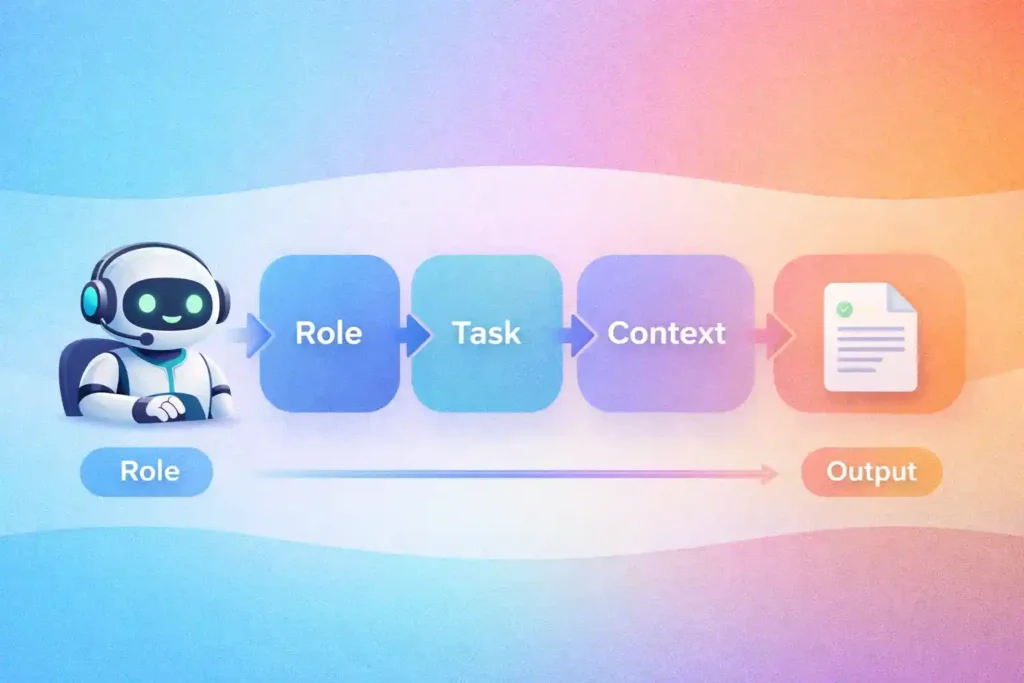
A simple structure is helpful. When you write prompts, keep in mind the four things: role, task, context, and output format. These sections turn a nebulous idea into a defined plan.
What should the AI do?
Tell the AI what kind of hat to put on.
- For example, “You are a history teacher with a lot of experience.”
- Why: It sets the mood and depth. Say that you want a friendly explanation. Say you want a report from a professional.
Task — what do you want done?
Say clearly what the major job is.
- For instance, “In plain English, what started World War I?”
- Keep it short and to the point.
Context — extra details the AI needs
Please provide any important facts, restrictions, or choices.
- For instance, “Use a simple example of two countries fighting over trade and keep it under 300 words.”
- Context avoids people from getting confused and helps you find the proper answer faster.
What format should the answer be in?
Tell the AI what kind of answer you want.
For instance, “Write an email,” “Make a numbered list with sources,” or “Give three bullet points.”
- This is really useful for items you wish to use again, such code, social media posts, and summaries.
Putting it all together: “You are a nice person to study with.” Now, tell a 14-year-old what photosynthesis is. Use a short example and don’t go over 200 words. “Make a list of three things.”
That one prompt makes it easy for the AI to do its work, and you get a rapid and useful answer.
Examples of Good and Bad Prompts
Seeing similarities is helpful. Here are some simple ways to make your prompt better.
Not good: “Tell me about advertising.”Good: You teach people how to market. In fewer than 200 words, explain three basic digital marketing platforms (SEO, email, and social media) and give an example of each for a small bakery.
“Make up a story” is bad.
“You write stories for kids.” Write a 400-word narrative for youngsters ages 6 to 8 about a shy fox who learns how to sing. Put a line that repeats at the conclusion of each paragraph.
Not good: “Plan your meals.”
Good: “You’re a nutrition coach.” Plan three days’ worth of vegetarian meals for a busy student who needs roughly 2,000 calories a day. “Add a list of groceries and fast recipes.
Things People Do Wrong When Writing Prompts
A lot of people who are new to something make the same blunders. Watch out for these.
- Not clear enough. “Help me” isn’t enough. Please tell me more.
- Too lengthy or all over the place. The AI doesn’t understand requests that continue on and on. Turn long thoughts into bullet points.
- Not attaining the goal. The AI will assume if you don’t tell it why you need anything (tone, audience, duration).
- No format instruction. Tell the AI if you want bullets, example code, or an email.
- If the AI can remember what was spoken in the past. If the conversation is new, say key points again.
It’s easy to fix: be clear, short, and to the point, and tell the AI what format you want.
How to Write Prompts Faster
Theory is not as good as practice. These are some fast techniques to improve:
- Copy good prompts. Use prompts that work as bookmarks and save them for later.
- Make changes and test. Change one thing at a time (tone, length, role) and see what happens.
- Save versions. For jobs you do often, establish a small library of prompts.
- Ask for explanations. If the AI’s answer doesn’t make sense, say, “Why did you include X?” This will help you understand.
- Use examples. Show the AI a short example of what you like and ask it to copy the style.
- Give it some thought. After you receive the answer, write down which sentence helped the most and what information you didn’t have.
Three writing prompts a day is a quick approach to improve.
How to Write Clear AI Prompts
You can utilise these fast, helpful recommendations right away:
- Start with a role. “You are a…” sets the mood.
- In one sentence, say what you want. Be explicit about what you desire.
- Set clear limits. For example, the quantity of words, the audience, the tone, or the structure.
- Use bullets for details. Bullets make it easier to read and keep things in order.
- Ask for examples. “Give two examples” is a good way to ask for something useful.
- Pick the voice. Talk about the style of a famous person (but don’t try to sound too much like them) or use phrases like “friendly,” “professional,” or “casual.”
- Request a brief summary. If you want to obtain the main point quickly, ask for a summary of 1 or 2 sentences at the top.
- Don’t worry, just keep going. If the prompt isn’t ideal, change it and run it again, but only make a few changes each time.
- Be nice. It may sound obvious, but asking “please” and using straightforward language often gets you better outcomes.
Conclusion
Writing prompts is a modest talent that pays off big time. Give the role a name, explain what the job is, add some background information, and say what format the output should be in to start. When you get a prompt, think of it as a short conversation with a buddy who is helpful, clear, and focused.
You may get better rapidly by copying templates that work, making modest adjustments, and saving prompts that you like. Soon, it will be easier for you to acquire better answers. That’s the point: labour more and guess less.
Want to preserve a template? This is the first prompt: “You are a [role]. Please help me with [work]. Make sure it’s [length] for [audience] and deliver the answer in [format]. “Add [important detail].
Enjoy it. Make it your own. 😊
