

AI Editing Prompts: The Complete Guide to Rewriting & Improving Text
Why AI Editing Is So Popular Right Now
A few years ago, editing meant reading your work five times, hiring a freelance editor, or just putting it out there and hoping for the best. What now? People are using ChatGPT or Gemini to paste in their content and get a polished version back in less than a minute.
There is a real change, and it’s not going to stop.
Bloggers change the intros that aren’t working. Students break up long paragraphs before they turn in their work. Freelancers can change the tone of emails from customers in just a few seconds. Professionals clean up reports that would have taken them hours to do by hand.
But here’s something that most people don’t know: how good your AI edit is mostly depends on how good your prompt is. You can’t just copy and paste text and tell someone to “fix this.” AI tools need to know what to do, like what their job is, what tone to use, and who they are talking to. That’s where editing prompts come in, and getting them right is very important.
What Are Editing Prompts?
An editing prompt is a clear command you give an AI tool to change, rewrite, or make better text that is already there. Writing prompts tell the AI to create something new, while editing prompts tell it to improve something you already have.
“Write me a description of a product” is an example of a writing prompt. An editing prompt says, “This is how I describe my product.” Cut it in half and make it more interesting.
It’s important to know the difference because editing means that the AI has to keep your ideas, voice, and meaning while making the execution better. A good editing prompt tells the AI what to keep and what to change.
What AI Can Edit Today
AI tools are now very good at handling many types of content. Here are some real-life examples of how to use it:
- Blog posts—getting rid of passive voice, making the flow better, and tightening up the introductions
- Social media captions—making them more fun or more like the brand
- Emails—changing the tone from too casual to too formal (or the other way around)
- Essays and academic writing—making sentences and ideas clearer
- Video scripts—making the talk sound more real
- Descriptions of products—making the writing easier to understand and more persuasive
- LinkedIn posts—making them sound more believable without being too formal
- Cover letters—making the writing more clear and sure of itself
AI can definitely help if the words on the page aren’t doing what you want, but you need to be very clear about what you need.
Core Types of Editing Prompts
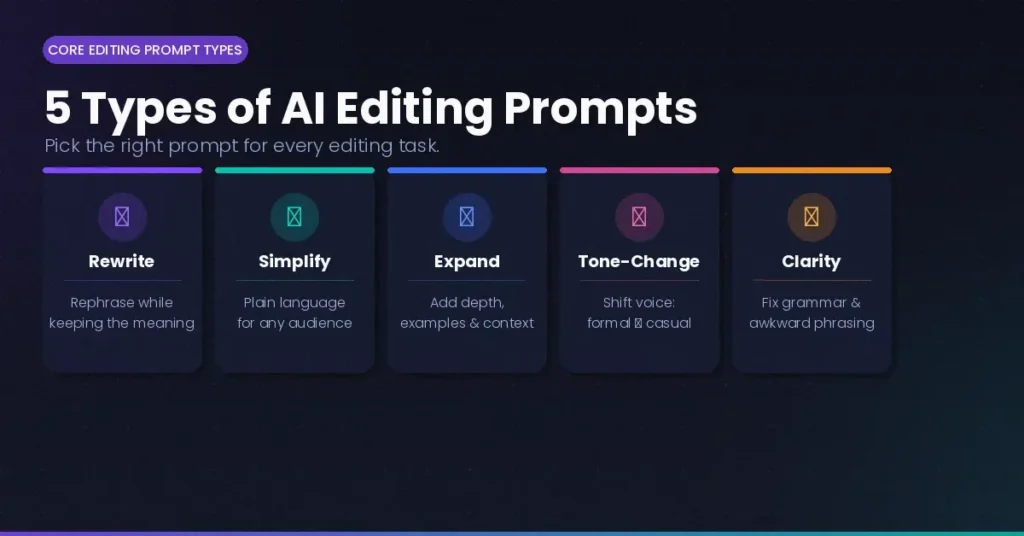
Not all editing jobs are the same. Here are the five main types of AI editing prompts and when to use each one.
Rewrite Prompts
These tell the AI to keep the main idea of your content but change the way it is structured or worded. If your draft seems too long, repetitive, or just “off,” but the ideas are good, use them.
Simplify Prompts
These tools make reading easier by getting rid of jargon, shortening phrases, and so on. This is great for technical writing, academic writing, or anything that seems too hard for most people to understand.
Expand Prompts
You can tell the AI to add to your draft with “expand prompts” if it is too thin and doesn’t have enough depth, examples, or context. Great for parts of a blog that look like they aren’t finished or bullet points that you want to turn into full paragraphs.
Tone-Change Prompts
This is one of the best groups. These change how your content sounds, making it sound more formal or casual, serious or fun, or cold or warm. Very useful for making the same content work for different platforms or audiences.
Grammar & Clarity Prompts
Not hard, but strong. These will find mistakes, fix strange phrasing, and make your sentences more organized without changing the meaning or tone of what you wrote.
Copy-Paste Editing Prompts
You can use these text editing prompts right away in ChatGPT, Gemini, or any other AI tool. At the end of each prompt, just type your words.
“Make the text below sound more polished and professional.”” Change the way it is written and the words used to make it better while keeping the same meaning.Text: [paste here]
Help beginners out “Make this text easier for someone who has never read it before to understand. Don’t use technical language, and keep your sentences short and your words simple. Text: [paste here]
“Rewrite this to make it more interesting and fun.” Add energy, change the length of the sentences, and make it more fun to read without changing the main ideas. Text: [paste here]
Make the Ideas Bigger “To make this text longer, you need to add more details, examples, and context.” Keep the main ideas, but add more details and fullness to the writing. Text: [paste here]
Fix the Grammar and Clarity “Make sure this content is clear, has no spelling or grammar mistakes. Please change any sentences that sound weird, but keep my voice and tone.Text: [paste here]
Make Everything More Clear “Edit this content to make it easier to read and understand.” Make the words clearer, get rid of any parts that are hard to understand, and make sure that each line flows into the next. Text: [paste here]
Make the tone more friendly and casual “Make this sound friendly and like you’re talking to a friend. I want to feel like I’m talking to a friend, not a business person.Text: [paste here]
Change Tone to Formal > “Write this in a formal, professional way that is appropriate for a business report or official communication.”Don’t use slang, and make sure the words are clear and polite.” Text: [paste here]
Most of the editing situations you’ll run into are covered by these “AI editing prompts.” Save these as bookmarks. They save a lot of time.
How to Use Editing Prompts Step-by-Step
Editing prompts are easy to use, but having a clear plan makes the results much more consistent. This is how the method really works:
Step 1: Copy and paste your text
Take the part you want to improve and copy it. You don’t have to copy and paste the whole thing. It’s usually better to work on one paragraph or part at a time.
Step 2: Choose what you want to change
Think about what you really want before you write the prompt. Is the text too long? Does it sound like a machine? Isn’t it clear? Giving the AI one clear goal for each session helps it stay focused.
Step 3: Follow the prompt
You can pick one of the prompts above or make up your own with a clear goal. Put your text after the prompt and label it clearly, like “Text: [your content here].”
Step 4: Check the output
Don’t just accept the first answer. Put it next to the original and read it. Did the AI understand what you meant? Is the tone what you were going for? Change your prompt and try again if something isn’t right.
Step 5: Change things if you need to
Editing with AI usually takes two steps. You could start with a prompt to rewrite something and then give yourself a prompt to make it clearer. When you layer prompts like this, you have a lot more control over the final output.
ChatGPT vs Gemini for Editing
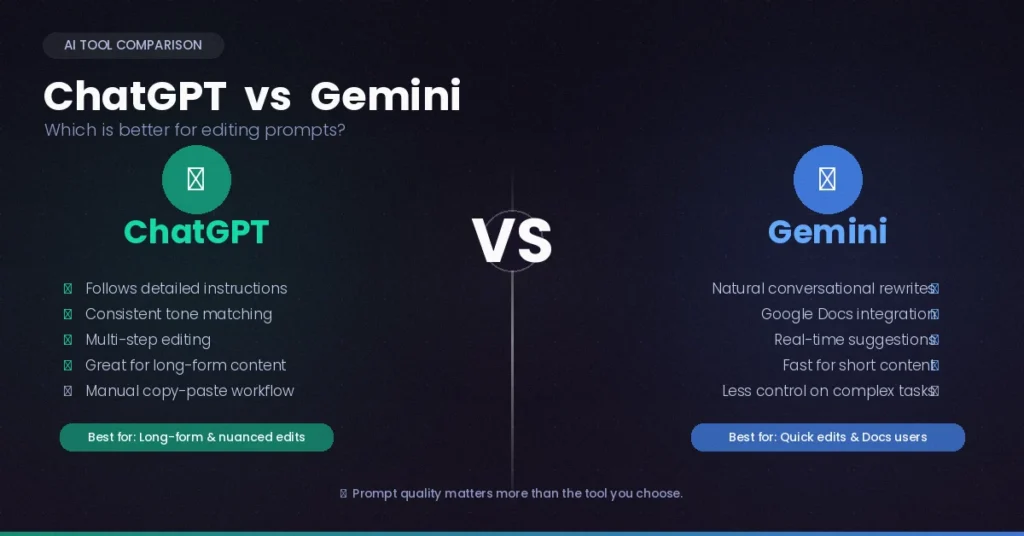
Both are good choices for “improve writing with AI” tasks, but you should know that they can do different things.
ChatGPT is good at following instructions that are long and hard to understand. A longer prompt with clear rules about the audience, tone, and word count usually works well. It also does a great job of keeping its voice when you tell it what to do.
Gemini editing prompts are great for short pieces of writing and making sure the facts are right. Gemini works well with Google’s tools, which is great if you need ideas right away or are using Google Docs. It also does a good job of rewriting conversations.
The tool you have right now is the best one. Both of them respond well to simple, direct questions. Most people don’t think the difference between them is as big as it is. The quality of your prompts is much more important than the platform you choose.
Common Mistakes People Make When Editing Prompts
These are the things that annoy people and don’t help them get what they want. You can easily stay away from all of them.
Not being clear enough. “Make this better” doesn’t help the AI in any way. “Better” means different things depending on what you want to do. Always explain what “better” means.
Too many changes at once. The AI can’t handle “rewrite this, make it shorter, change the tone, fix the grammar, and make it funnier,” and it usually ends up with a mess. Pick one goal for each prompt.
Not telling the AI who it’s for or what it should sound like. If you don’t tell the AI who it’s for and what it should sound like, it might guess wrong and not fit your brand or voice.
Not giving the text as it is. Some people say things like “rewrite my introduction” without really copying and pasting the text. The AI can only read your files and thoughts if you give them to it directly.
Taking the first output without checking it over. Changes made by AI are just the beginning, not the end. Always read the result before using it.
Tips to Get Better Editing Results
Here are some habits that really help:
Know who your audience is. Adding “for a non-technical audience” or “for senior executives” makes a big difference in the outcome. One of the most important things you can tell is who your audience is.
Set a word count goal. Tell us if you want a shorter output.”Rewrite this in less than 100 words” is a lot better than “shorten this.”
Use examples when you can. Give a short example of writing that sounds like what you want and say, “Rewrite my text to match this tone.”
In Google Docs, use Gemini editing prompts. Gemini’s built-in integration lets you edit without having to copy and paste back and forth, which saves you time if you use Docs for work.
Build your own library of prompts. Once you find a revision prompt or clarity prompt that works well with your writing style, save it. Over time, you’ll build a set of editing tools that work better and faster.
Don’t start over if the result isn’t perfect; instead, give a follow-up instruction. Instead of running the whole prompt again, it’s better to say, “That’s good—now make it 20% shorter.”
Final Thoughts
AI editing doesn’t mean rewriting your work; it just means making it easier to get from a rough draft to a finished version. People who get the most out of tools like ChatGPT and Gemini don’t use them to do the work. They are using them to make things look better.
“Rewrite prompts,” “simplify prompts,” and “tone-change prompts” are all examples of tools that can help with different problems. The more you know how to use them, the faster you’ll be able to edit.
To get started, use the copy-and-paste prompts in this guide. Use them in your next draft. Keep track of what works, change what doesn’t, and keep the versions that always work.
That group of tested prompts? That’s how you change things. It’s a lot easier to edit once you have one.
